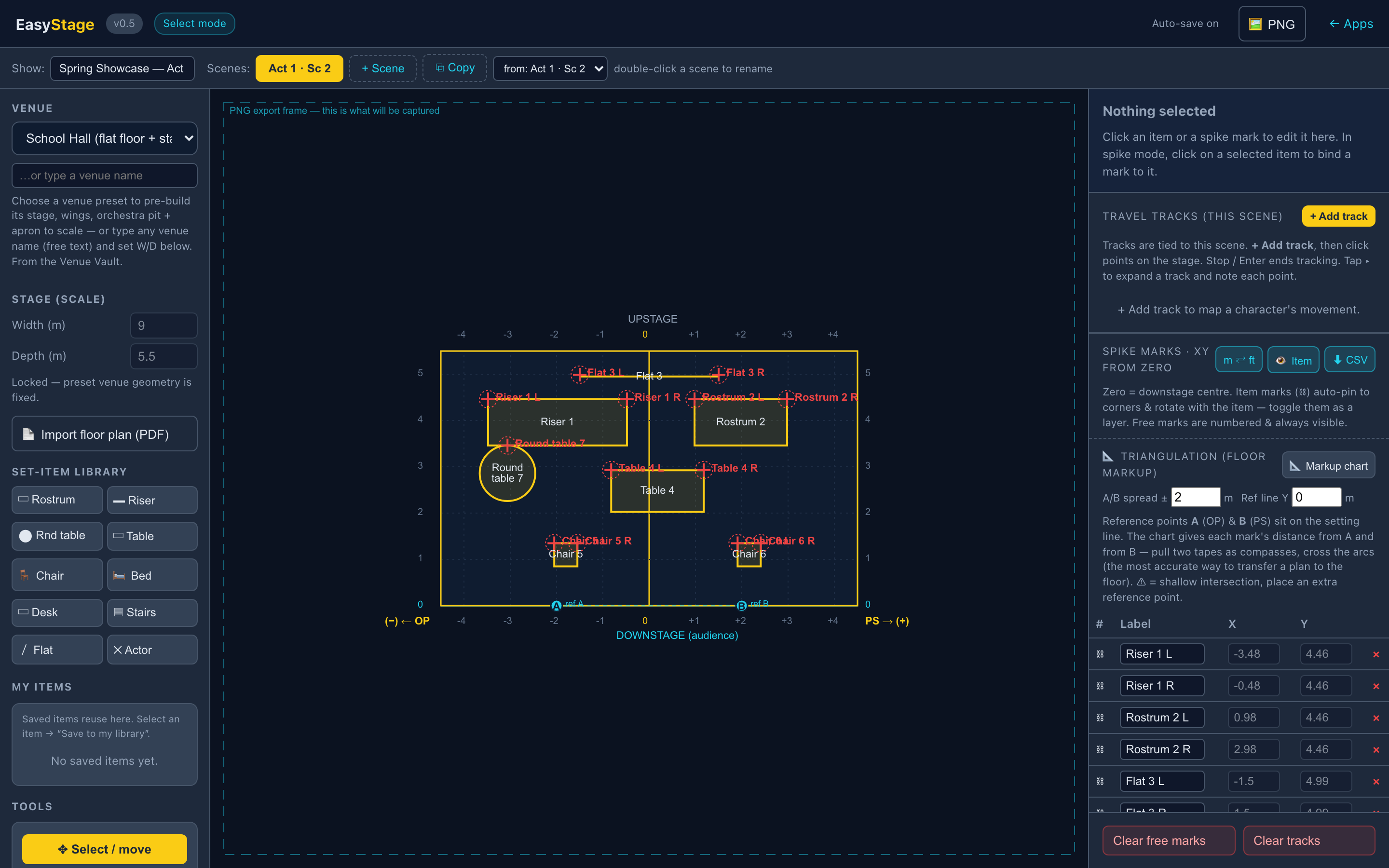
Stage managers still mark out the set with a tape measure and a memory. EasyStage turns a scaled floor plan into accurate spike-mark coordinates, tracks every prop and cast move, and gives you a record that travels with the show — so the next venue is a re-mark, not a re-invention.
Built for the way a stage manager and a choreographer actually work — plan view, to scale, and exportable to a spreadsheet you can take into the rehearsal room.
Start from a scaled rectangle of your stage, or import a venue floor plan as a PDF or DXF. Everything you place stays true to scale, so your measurements mean something.
Drop in basic shapes — squares, circles, lines — or a small library of set items (chair, table, bed, desk, riser, staircase). Give each an X/Y size to scale, a text label in the middle, then lock the layer so nothing drifts. Unlock to rotate, move and re-place anytime.
Tap the corner (or any point) of a set item and allocate a spike mark. EasyStage measures it from the downstage zero line and the centre line and drops it into a table — a clean, accurate spreadsheet of every mark, ready before you ever walk into the room.
Track a performer or prop from entry to exit. Place a marker, set a new position, and draw the path between — a straight line you can transform into an arc with a centre point to match the real move.
Mark where each move begins and ends — set an in point and an out point for every entrance and exit right on the scaled plan. The crew sees exactly where a performer or prop comes on, and where it needs to be gone, on the same plan as the spike marks.
Capture choreography and cast formations per character, each in its own colour. Toggle paths on and off like layers in Photoshop to see where moves intersect and overlap.
Organise by production: Sweeney Todd → Act 1 Scene 1 → floor plan, spike marks, travel paths. Multiple plans per scene, each with its own tracking tabs — your whole show, scene by scene.
When the show moves house, load the same set against a new venue outline and re-mark to scale in minutes. Keep a plan per venue so a tour is a re-mark, not a re-invention — the design travels with the show.
From a blank stage to a spike-mark spreadsheet in four steps.
Drop in a scaled rectangle or import the venue plan (PDF / DXF). Downstage is the bottom line, upstage the top — true plan view.
Add set pieces as scaled icons with labels. Lock the layer so the design holds; unlock to adjust whenever the director changes their mind.
Tap the points you need to mark. EasyStage calculates XY from the zero lines and builds the table automatically.
Export the spreadsheet, verify with a tape measure in rehearsal, and you've got a record that re-marks the set in minutes when the show moves venues.
EasyStage is part of EasyStageManager — one subscription also unlocks EasySM (stage management). All prices AUD. Monthly or yearly (yearly saves ~17% — two months free). Look around free for 30 minutes, then pick a plan.
One subscription unlocks every EasyStagecraft app — EasyStage, EasySM, EasyScheduler, EasyRisk, EasyInventory & EasyOrchestra — for your whole team, one connected production.
EasyStage is part of the EasyStagecraft Suite — it links into EasySM, EasyScheduler, EasyRisk and EasyInventory so one production lives across one connected set of tools, not a dozen spreadsheets.
Explore the Suite →